XTAze can be connected to a terminal device and corresponding transponders (chips). We work in cooperation with the manufacturer Datafox. To record time stamps via the terminal, the XTCardreader interface is required.
XTCardreader can be run either as an executable Windows application or as a Windows service. We recommend using the application only for troubleshooting and running the Windows service for daily operation, as it runs continuously in the background.
Make sure to install XTCardreader directly at the top level of drive C:\. The directories C:\Program Files or C:\Program Files (x86) do not provide sufficient permissions to run the service.
You receive the latest version of XTCardreader when purchasing the corresponding terminal from Xpert-Timer Software.
Run the installation wizard. After installation, you will find the following files in the installation directory:
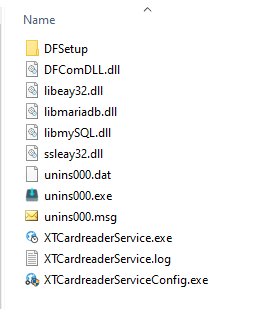
The file XTCardreaderServiceConfig.exe starts the service configuration. The card reader is usually detected automatically by XTCardreader on the network. Make sure that the terminal is connected to the network and has been assigned an IP address.